
A BACnet site you cannot enumerate is a BACnet site you cannot operate. Before trends, alarms, or schedules exist, somebody has to answer a plain question: which devices are actually on this network, and which objects do they really carry?
That sounds trivial on a drawing and is anything but on a live plant floor. Display names can be duplicated or stale, routed serial trunks may not yet be reachable, and an old export may no longer describe the site. This guide walks through device and object discovery in BAaaS, Hexomation’s managed gateway platform — how discovery reaches the field, what an object read tells you, and where discovered ends and monitoring begins.
Where BAaaS fits
BAaaS is Hexomation’s managed gateway platform for building automation: you install a gateway on the site, it picks up a device identity tied to that site, and from there the platform drives a multiprotocol field path — BACnet/IP and MS/TP via supported routers, plus Modbus — toward a cloud console. What follows that onboarding is the operational layer: monitoring selection, groups, trends, alarms, schedules, dashboards, and analytics over the points the inventory exposes.
On the trust side the same gateway can act as a BACnet/SC node or primary edge hub with its own certificate lifecycle, and the platform adds AI assistance, an Android field app, and governance controls like MFA, RBAC, and audit logging. Feature availability varies by plan, version, and hardware entitlement — treat any of these as capabilities to confirm on your entitlement, not defaults you get by installing.
What discovery actually answers
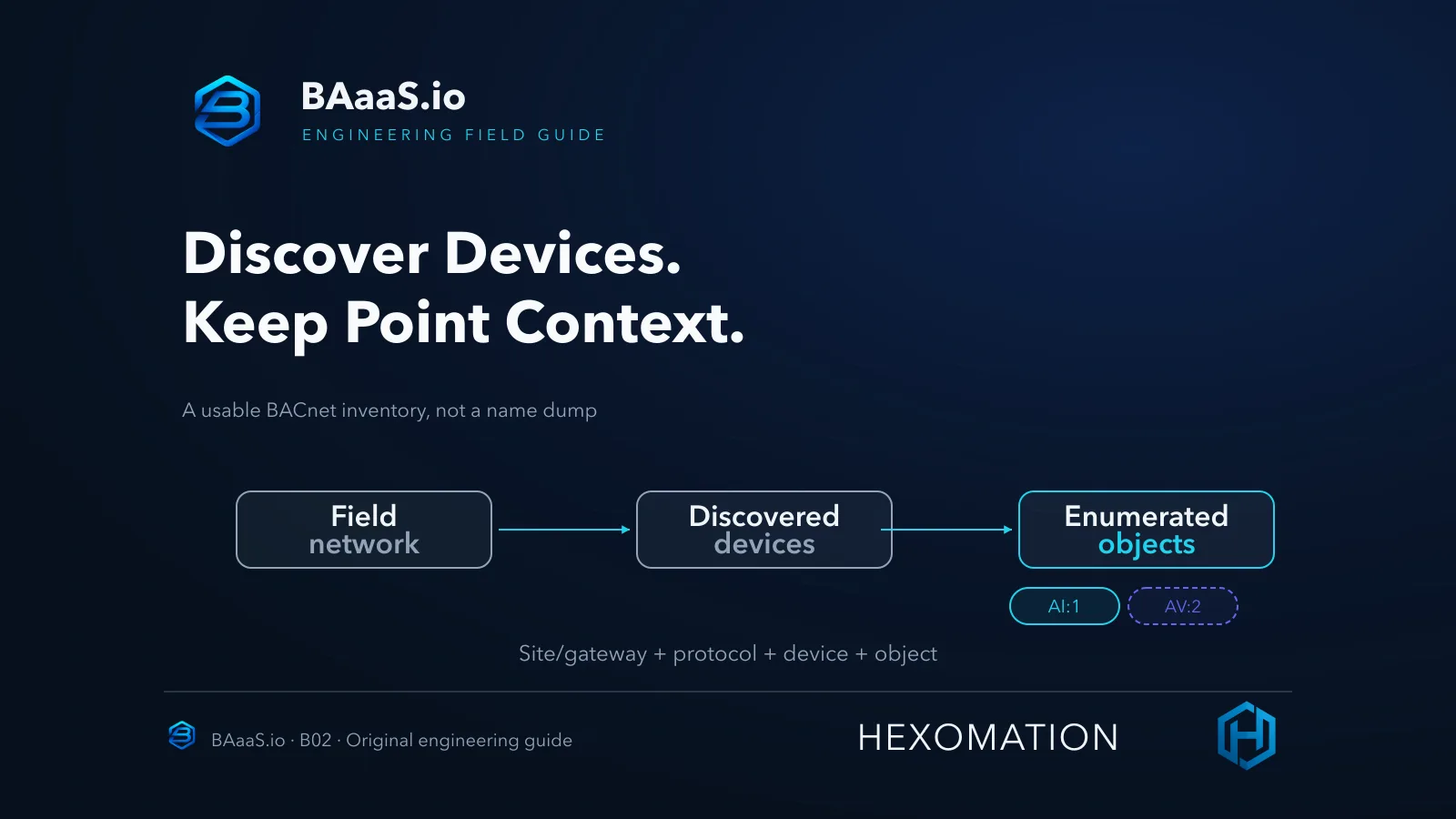
Discovery is a staged answer, not a single sweep. First the gateway issues Who-Is on the active datalink and collects the I-Am replies from reachable devices — that gives you device candidates. Then you select a specific device and ask for its object list, which the platform enumerates and filters to the operational object types it supports.
That filtering matters. The enumerated list covers the points the platform can meaningfully work with; it is not a promise to surface every proprietary object a vendor’s controller happens to carry. A controller can legitimately hold objects the platform simply doesn’t enumerate — which is one reason a raw vendor engineering export and a platform inventory answer different questions.
Treat each phase as evidence with a scope: I-Am means “a device answered on this transport,” and an object entry means “this device exposes this object to the platform.” Neither statement says anything about devices behind unconfigured routed or serial segments, or about objects outside the supported set.
Choose the right transport path
Discovery runs on the datalink the gateway is actually using. On BACnet/IP, the gateway needs its interface on a network where Who-Is broadcasts and replies can flow — the default UDP 47808, or whatever the site’s actual configuration specifies. If the subnet you expected does not answer, the discovery didn’t fail silently; the devices were never in reach of that path.
MS/TP trunks are a different conversation. The platform reaches them through a supported BACnet router or hardware path — do not assume that plugging a generic serial adapter into the host creates a supported trunk connection. Before blaming discovery, ask which transport the gateway should be on, and whether a routed segment needs its router configured before a single I-Am can arrive.
This article does not cover transport configuration itself — setting up SC links, routers, or legacy adapters is a separate deployment task with its own prerequisites. Discovery assumes the datalink is already selected and healthy.
Read device identity, not just a name
An I-Am tells you a device answered — the transport context is whatever datalink you ran the Who-Is on, and the durable BACnet identity is the device instance number it carries. Device names are friendly but unreliable keys: “AHU-1” labels get duplicated across sites, and a renamed or stale label doesn’t change the instance it was issued on.
The BACnet device instance is required to be unique across a BACnet internetwork — routed IP and serial links included — so two devices answering on different transports with the same instance is a misconfiguration, not a separate namespace. Keep that distinct from the platform’s internal per-protocol row identifiers, which are database keys, not protocol identity.
When you record inventory, keep the full point key: the site and gateway that saw the device, the protocol, the BACnet device instance, and the object type and instance. In the console, inventory anchors to that tuple — which is what keeps objects discovered through different paths from collapsing into one ambiguous list.
Walk an illustrative inventory
The tree below is synthetic — every identifier was invented for this article, and the device count, instances, and property values are illustrative, not from a live site or any particular vendor. It shows the shape of an honest inventory: device identity on the left, the operational objects the platform enumerated beneath it, each carrying type, instance, units, and a status snapshot.
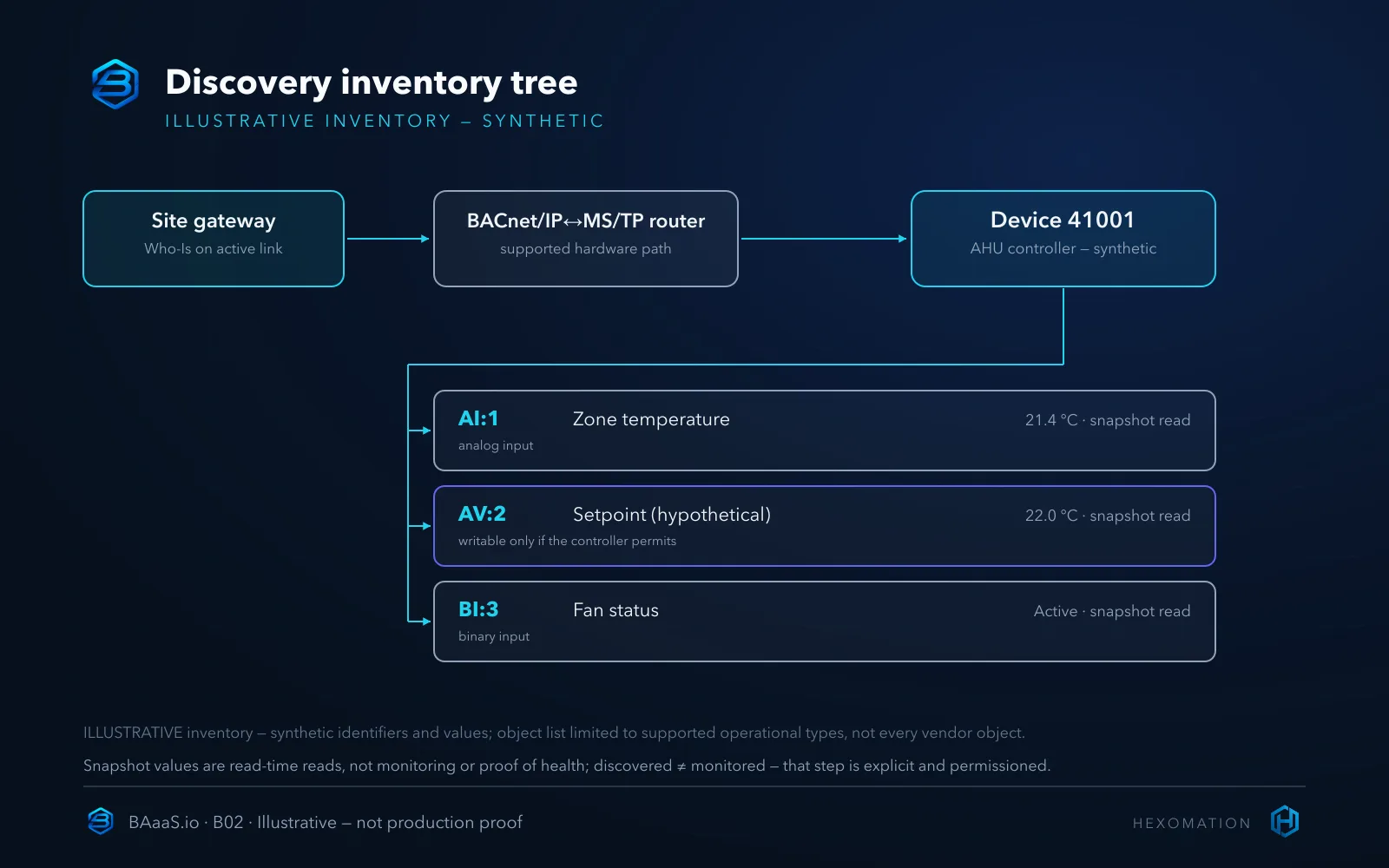
Read the entries the way the platform sees them: AI:1 is an analog input carrying a temperature with engineering units; AV:2 is an analog value — here shown as a hypothetical setpoint, though the object type alone does not prove it is writable on your controller; writability depends on that controller’s object model and your permissions. A binary input like BI:3 tells you a state, not whether the fan motor is actually healthy.
Object type and instance are the identity again; the label “Zone Temp” is decoration. When you later reference a point in a group or an alarm, you are referencing AI:1 on device 41001 through this gateway — not a string someone typed.
Read properties as a snapshot, not a diagnosis
When you inspect an object you get a read of its current properties: present value, engineering units where the object carries them, and status or reliability flags the object chooses to report. That is a snapshot taken at read time — useful, and easy to over-interpret.
A present value of 21.4 °C proves the object answered with that value at that moment. It does not prove the sensor is calibrated, that the reading is still live five minutes later, or that anything is monitoring it. A clean status flag means the object reported no fault at read time — not that the system is healthy, since a stuck input can sit at a plausible value for days.
Reliability and status fields deserve a read before you trust the number — a value reported with a fault flag is a different fact than the same value reported clean. But treat the whole row as “what the object said when asked,” not “what the plant is doing.”
Discovered is not monitored
The platform deliberately separates the two states. Discovery produces the inventory of devices and their enumerated objects; adding an object to monitoring is an explicit step with its own permission and plan-budget gates. Seeing 800 points discovered does not mean 800 points are trending — it means you know what is there and can choose deliberately what to supervise.
That separation is a feature, not friction. Unsupervised sites routinely carry thousands of points; monitoring everything by default turns a manageable plan into a budget problem and floods the console with noise nobody triages. The inventory exists so the monitoring decision is informed, not automatic.
Configuration and monitoring setup — picking objects, thresholds, schedules — is its own workflow outside this article’s scope. Here it is enough to internalize the boundary: discovery populates a catalog, monitoring consumes it.
The write boundary
Property reads and writes are separate authorized operations, and the console treats them that way — a user able to inspect an object is not automatically authorized to command it. BACnet also models writes with priorities and relinquish semantics on writable objects, and getting that wrong on a live controller can affect plant operation — so the point isn’t “override the hardware interlocks”; it’s that a careless write can still change behavior in ways nobody intended.
This article describes the boundary and nothing beyond it: no write commands, no priority arrays, no relinquish tutorials. If you need to exercise writes, do it in an isolated lab with explicit approval — never as a side-effect of building an inventory on a production network.
The reason to mention it at all is that the same object list that shows you AI:1’s temperature also shows you AV:2 — which could be an operator-adjustable setpoint on this hypothetical controller. Knowing which entries might accept writes is part of reading the inventory correctly; whether this one actually does is a controller-model and permissions question, not something the type asserts.
Where this fits in BAaaS
The practical advantage is continuity. Inventory built in BAaaS feeds the same console where monitoring, alarms, and operations live — the objects you discovered are the objects you later supervise, without exporting a CSV into a second tool and hoping the labels line up.
The honest tradeoff: a vendor’s engineering tool may still expose proprietary diagnostics and vendor-specific objects the platform does not enumerate. Deep commissioning of a specific controller still belongs in that tool. The platform inventory is the operational picture — the set of things you intend to run, not a forensic capture of every register the vendor shipped.
Run the discovery workflow
In the console, confirm you are on the active site first — discovery attaches to the site’s gateway. Then start device discovery (Who-Is on the active datalink), watch progress to a finished state, and only then select a responding device for object enumeration. A request acknowledgement is not a result — watch for the session’s actual completion before reading anything into the list.
Discovery carries permission and plan-budget gates, and an empty result is not necessarily a network fault — the device may be offline, the session incomplete, or your permissions insufficient. Investigate each before concluding.
Limits to keep in mind
Discovery is bounded by the path it runs on. A device behind an unconfigured routed segment or a serial trunk with no supported path simply won’t answer — an empty result is a question, not a verdict. Availability also follows your plan and permissions.
Nor is an inventory a one-time artifact — controllers get swapped, renamed, renumbered. Re-run discovery as the site changes, and treat a stale inventory like stale documentation.
Build the inventory before you build on it
The readiness checklist below is deliberately empty — no pass marks implied. It is the set of questions to answer on your network before you start building groups, alarms, and schedules on top of what you found.
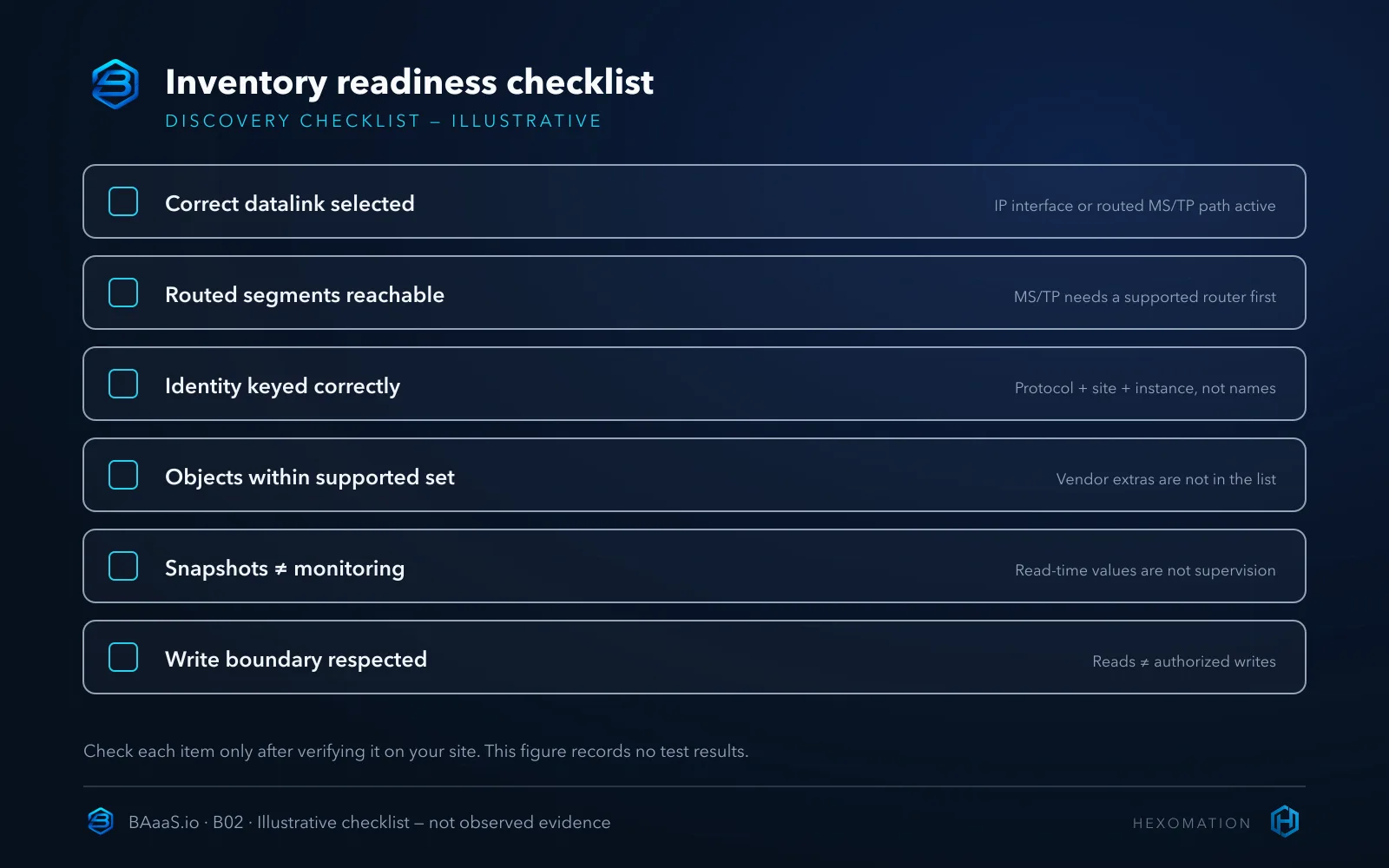
Once the inventory is honest, everything downstream gets easier: monitoring picks from known objects, alarms name real devices, and audits have something to compare against. If you skipped the earlier certificate and gateway onboarding walkthrough — the step that gets the gateway this discovery runs on — it is published alongside this one at BAaaS gateway onboarding.
To evaluate device and object discovery on your own sites, review the capability overview at BAaaS.io/features. Follow-on guides cover monitoring selection, object writes under authorization, and routed-network discovery in more depth.